
AI-Generated Logos vs. Vector Logos: Why Your Business Needs Vector Artwork Before Printing
Posted by Impress Athletix on 07/28/2026
AI-Generated Logos Look Great—Until It's Time to Print
Artificial intelligence has transformed logo design. With just a few prompts, AI can generate dozens of professional-looking logo concepts in minutes. For startups, schools, sports teams, nonprofits, and small businesses, AI offers an affordable way to begin building a brand.
However, there is one important limitation that many people don't discover until they place an order for shirts, signs, or promotional products.
Most AI-generated logos are not production-ready.
If you plan to use your logo on uniforms, embroidery, promotional products, banners, vehicle graphics, or storefront signage, you'll almost certainly need a vector version of your logo.
Understanding the difference between raster and vector artwork can save time, money, and frustration.
What Is an AI-Generated Logo?
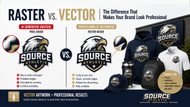
Most AI image generators create logos as raster images, which are made up of thousands (or millions) of tiny colored pixels.
Common file types include:
- PNG
- JPG
- JPEG
- WebP
These files are excellent for:
- Websites
- Social media
- Email signatures
- Digital presentations
But they aren't ideal for professional production.
Why Raster Logos Don't Work Well for Printing
Raster graphics have a fixed resolution.
When they're enlarged, the pixels become visible.
That often leads to:
- Blurry edges
- Jagged lines
- Fuzzy text
- Inconsistent curves
- Poor print quality
This becomes especially noticeable on:
- Company uniforms
- Large banners
- Vehicle wraps
- Storefront signs
- Trade show displays
The larger the logo becomes, the worse the quality gets.
What Is a Vector Logo?
Unlike raster artwork, vector graphics are built using mathematical paths instead of pixels.
Common vector formats include:
- SVG
- EPS
- AI (Adobe Illustrator)
- PDF (Vector)
Because vectors are resolution-independent, they remain perfectly sharp whether they're printed at one inch or twenty feet wide.
That makes them the industry standard for professional branding.
Why Printers Ask for Vector Files
Most commercial printing equipment is designed around vector artwork.
Production methods that typically require vectors include:
- Screen Printing
- Embroidery
- Heat Transfers
- Vinyl Cutting
- Laser Engraving
- Promotional Products
- Business Signs
- Vehicle Graphics
- Trade Show Displays
- Decals
- Stickers
If you only provide a PNG or JPG, your printer may need to recreate your logo before production begins, increasing cost and turnaround time.
Why Upscaling Isn't the Same as Vectorization
Many AI tools advertise image enhancement or "upscaling."
While these tools increase image resolution, they do not convert pixels into editable vector artwork.
Upscaling:
✔ Makes images larger
But it doesn't:
- Create clean vector paths
- Improve line quality
- Produce editable artwork
- Prepare files for production
Think of it as enlarging a photograph.
It gets bigger—but not better.
Benefits of Vectorizing Your AI Logo
A professionally vectorized logo becomes your brand's master artwork.
Benefits include:
Unlimited Scalability
Print your logo on:
- Business cards
- Polo shirts
- Team uniforms
- Billboards
- Building signage
—all without losing quality.
Easier Editing
Need to:
- Change colors?
- Update your business name?
- Remove a tagline?
- Resize an icon?
Vector artwork allows quick, precise edits.
Perfect Color Consistency
Vector files support professional color systems like:
- Pantone®
- CMYK
- RGB
Helping ensure your brand colors remain consistent across every product.
Better Embroidery Results
Embroidery digitizers work from clean vector artwork.
The cleaner your logo, the better your embroidered hats, polos, jackets, and bags will look.
A Long-Term Brand Asset
Once vectorized, your logo can be used for years on:
- Uniforms
- Promotional products
- Business cards
- Websites
- Packaging
- Storefront signs
- Tradeshow displays
- Event merchandise
Automatic Vector Conversion Isn't Always Enough
Online auto-tracing software often creates messy artwork filled with unnecessary anchor points.
This frequently results in:
- Uneven curves
- Distorted lettering
- Poor spacing
- Rough edges
- Difficult editing
Professional vectorization involves rebuilding artwork with clean curves, smooth lines, and properly organized paths for production-quality results.
When Should You Convert Your Logo to Vector?
If you plan to use your logo on any of the following, it's time to create a vector version:
- Custom apparel
- Team uniforms
- Spirit wear
- Promotional products
- Company shirts
- Embroidery
- Vehicle graphics
- Storefront signs
- Window graphics
- Trade show displays
- Product packaging
- Banners
- Stickers
- Yard signs
Final Thoughts
AI is an incredible tool for brainstorming and creating logo concepts. It can save time and spark creativity.
However, when it's time to build a professional brand, a production-ready vector logo is one of the smartest investments you can make.
Whether you're printing one shirt or branding an entire fleet of vehicles, clean vector artwork ensures your logo looks sharp, consistent, and professional everywhere your business appears.
At Impress Athletix, we help businesses, schools, teams, and organizations prepare logos for professional production. If your AI-generated logo isn't ready for printing, we can evaluate your artwork and create clean, production-ready vector files suitable for embroidery, apparel, promotional products, signs, and more.